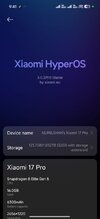
HyperOS 3.0 HyperOS 3.0 STABLE RELEASE


I did that, and then I get the error message above...
Retry USB Debugging and USB Debug Security on off, and change USB port on your pc

Have you restart your phone after usb debug activation ?
Have you authorised debugging o' your screen phone?

adb shell settings put global hide_gesture_line 1


Last thing "This will require you to sign into a Xiaomi account, and you need to have a SIM card inserted for this to work"
 
Last edited:
Hello. I want to translate the firmware into Russian. I myself am a user of Xiaomi 17 pro max. Although many items have been translated, I still come across untranslated items in applications and texts that are too long (as in the screenshot), most often the settings of the back screen.

Unfortunately, the link to the translation tutorial won't get you anywhere. I would like to do translation and proofreading in my free time.
 

Attachments

  • Screenshot_2026-10-10-16-06-27-581_lockscreen.png
    Screenshot_2026-10-10-16-06-27-581_lockscreen.png
    1.8 MB · Views: 185
Hi everyone.
I admit I update the ROM every now and then; I'm currently on version 303 and hadn't encountered this issue before. I’m looking for some clarification: I rebooted into TWRP recovery to update to the new version, only to discover that TWRP was gone and replaced by the HyperOS recovery.
Since this has never happened to me, I did some research and gathered that the official recovery is no longer removed from the build, meaning it gets replaced with every update.
So, do I need to use ADB to reinstall TWRP after every update, or is there another method I missed?

Thank you
 
Hi everyone.
I admit I update the ROM every now and then; I'm currently on version 303 and hadn't encountered this issue before. I’m looking for some clarification: I rebooted into TWRP recovery to update to the new version, only to discover that TWRP was gone and replaced by the HyperOS recovery.
Since this has never happened to me, I did some research and gathered that the official recovery is no longer removed from the build, meaning it gets replaced with every update.
So, do I need to use ADB to reinstall TWRP after every update, or is there another method I missed?

Thank you
In xiaomi.eu recovery is stock. That is, in every image of Xiaomi.There is a recovery.img file inside, which is also stitched together with the rest of the firmware. So you'll have to flash the TWRP again after updating. It's always been that way.
 
In xiaomi.eu recovery is stock. That is, in every image of Xiaomi.There is a recovery.img file inside, which is also stitched together with the rest of the firmware. So you'll have to flash the TWRP again after updating. It's always been that way.
Not always, but at least since February.
 
Not always, but at least since February.
Thanks a lot for the clarification; I’ve been using the xiaomi.eu ROM for years, even though I rarely update it.
I don’t know if I’m the only one who encountered this surprise, but it would be great if you could add a note to the first post for other beginners like me!

Thanks a lot for everything.
 
Retry USB Debugging and USB Debug Security on off, and change USB port on your pc

Have you restart your phone after usb debug activation ?
Have you authorised debugging o' your screen phone?

adb shell settings put global hide_gesture_line 1


Last thing "This will require you to sign into a Xiaomi account, and you need to have a SIM card inserted for this to work"
I did exactly those things and it’s not working; does it work for you? Have you tried it?
 
Is this launcher's CPU usage normal? I cleared the app data and added my icons again, but this time only with an external calendar widget (not from HyperOS). I'm still getting high CPU usage on the launcher.

1792319509868.png
 
 
hyperos.svg


RULES WHEN POSTING
1. If a ROM is not published DONT ASK ABOUT ITS ETA
2. If a ROM is not published DONT ASK why!
3. If a ROM is available, download it and use it
4. If a ROM has bugs, post the bug to the bug section if the BUG is not already listed
5. If you use any form of abusive or derogatory language to admins or other users you will be BANNED forever!
6. If you quote whole first or second post, your post will be deleted and ignored
7. We do not own all supported devices, so in case of issue, post log to be able fix it
8. Only posts in English language are accepted

Full rules here: https://xiaomi.eu/community/threads/rom-release-thread-rules-final-warning-of-bad-conduct.51332/
FAQ here: https://xiaomi.eu/community/threads/frequently-asked-questions.73215/

DOWNLOAD STABLE

https://sourceforge.net/projects/xi...xiaomi.eu/HyperOS-STABLE-RELEASES/HyperOS3.0/

devices_stable_os3_26090813.png


Requirements:
  • Your device's bootloader must be unlocked.
Installing with Fastboot:
  • Download Xiaomi.eu ROM zip file
  • Extract the ROM zip to a new folder
  • Power off your device
  • Boot your device in Fastboot mode (Hold volume down + power buttons)
  • Connect to PC via USB cable
  • Run one of the installation scripts (according to your PC operating system):
    - install_and_format_data - with data wipe, if you're flashing Xiaomi.eu ROM for the first time or downgrading.
    - install_upgrade - without data wipe, if you're updating from an older Xiaomi.eu ROM.
  • Done!
Installing with TWRP:
(TWRP must be installed with Fastboot mode and ZIP signature verification must be disabled)
  • Download Xiaomi.eu ROM zip file
  • Reboot to TWRP
  • If installing for the first time or downgrading: Wipe -> Format Data
  • Copy the ROM zip file to the internal storage
  • Install -> Select the ROM zip file
  • Reboot to system
  • Done!
Updating via Updater app:
(A Xiaomi.eu ROM and TWRP must already be installed on your device)
  • Download Xiaomi.eu ROM zip file
  • Copy the ROM zip file to the internal storage
  • Updater -> Menu (...) -> Select update package
  • Select the ROM zip file
  • Confirm any dialogs
  • Done!
Notes:
  • Our ROMs are not pre-rooted.
  • Our ROMs were approved by the official EU distributor ABC Data to not void warranty for devices sold by them.
Included Languages:
For Translators:
  • Follow XML changes here
  • Examine errors in your repo here and here
  • Check our translation guide here
Give kudos to your translators. This is a huge group effort and continues to grow bigger!

Hello I'm new here I have a xiaomi 17pro max chinese version with build 3.0.319.0, Can you tell me if i can use this rom so I can have access to all gms and foogle apps? can i install on this build? thank you in advance for your help
 
Hello I'm new here I have a xiaomi 17pro max chinese version with build 3.0.319.0, Can you tell me if i can use this rom so I can have access to all gms and foogle apps? can i install on this build? thank you in advance for your help
bootloader must be unlocked first. i have the 17 pro version. it works well.
 

Attachments

  • WhatsApp Image 2026-10-21 at 09.41.39.jpeg
    WhatsApp Image 2026-10-21 at 09.41.39.jpeg
    31.5 KB · Views: 148
Last edited: