Fix for wallet, play store, banks and gov. apps for anyone update 18.10.2026


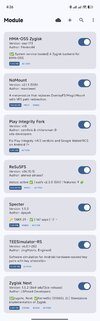
@Viking Hogar Strasni I have followed your guide properly and even celared google play store data from both app setting and from spectre. still the play store is uncertified. i have all the followed each instruction and yet couldnt fix the play store uncertified issue., can you tell me what am i missing here? Please
 

Attachments

  • 1792146547518.jpeg
    1792146547518.jpeg
    375.5 KB · Views: 73
  • 1792146567677.jpeg
    1792146567677.jpeg
    642.5 KB · Views: 73
  • 1792146586593.jpeg
    1792146586593.jpeg
    365.5 KB · Views: 73
  • 1792146601850.jpeg
    1792146601850.jpeg
    681.7 KB · Views: 67
  • 1792146620975.jpeg
    1792146620975.jpeg
    315.4 KB · Views: 75
@Viking Hogar Strasni I have followed your guide properly and even celared google play store data from both app setting and from spectre. still the play store is uncertified. i have all the followed each instruction and yet couldnt fix the play store uncertified issue., can you tell me what am i missing here? Please
Where in my module in hma-oss recomended!!
I didnt recomend KSUN v3.42
I recomend 3.40
Also, after you select Clear Gsm
exit Specter and press Action Icon on specter to clear GMS Data
 
Last edited:
Im not sure for this becaouse of subfolder Tools
At first, even though I think it needs all files in anykernel3.zip including subfolders.
But when I execute magiskboot command to unpack boot image it shows a few files like header, kernel, zram, etc.
I see the output an .img file, not another anykernel3.zip file, so it doesn't need all files from anykernel3.zip.
Then I read KernelSU Installation page and found out, "Unpack the AnyKernel3 package and get the Image file, which is the kernel file of KernelSU"

Then I tried it (extract only Image file from anykernel3.zip), unpack and repack boot.img and new-boot.img can boot properly.
 
At first, even though I think it needs all files in anykernel3.zip including subfolders.
But when I execute magiskboot command to unpack boot image it shows a few files like header, kernel, zram, etc.
I see the output an .img file, not another anykernel3.zip file, so it doesn't need all files from anykernel3.zip.
Then I read KernelSU Installation page and found out, "Unpack the AnyKernel3 package and get the Image file, which is the kernel file of KernelSU"

Then I tried it (extract only Image file from anykernel3.zip), unpack and repack boot.img and new-boot.img can boot properly.
But it doent cost you anything, in case of problem, you know what is
Also KernelSu will not activly support for GKI root
Also, and most importmant
There is 3 version of Anykernel for
KSU, KSUN i RESUKISU
All root managers and Twrp do the same thing magiskboot repack

Why autor of Anykernel is put tools folder and programs inside tools folder if it is of no use
WildJames and Alnasiff have reason for that
You cannot say statment that they doesnt know hot to make Anykernel image!!
Dont forget, they are developers of Anykernel version!!
So I dont agree with you and you give bad advice
 
Last edited:
But it doent cost you anything, in case of problem, you know what is
Also KernelSu will not activly support for GKI root
Also, and most importmant
There is 3 version of Anykernel for
KSU, KSUN i RESUKISU
All root managers and Twrp do the same thing magiskboot repack

Why autor of Anykernel is put tools folder and programs inside tools folder if it is of no use
WildJames and Alnasiff have reason for that
You cannot say statment that they doesnt know hot to make Anykernel image!!
Dont forget, they are developers of Anykernel version!!
So I dont agree with you and you give bad advice
I think you just misunderstanding what I mean.
I guess I never give bad advice.
FYI, before I made reply, I already tried this method for 3 root managers you mention above, so I will not misjudge anyone.
In the other hand, why you said KSU will not activily support GKI root, but you recommend it In post #1?
Have you read their page? "KernelSU officially support Android GKI 2.0 (kernel 5.10+)".

Yes there are 3 version of anykernel3.zip which is KSU, KSUN and BakaSU (formerly ReSukiSU).
To get temporary root, we need to make new-boot.img (patched_boot image), right?
This is what I mean.

FIles in anykernel3.zip has folders and .sh files for use to flash in TWRP or root manager.
But when we only want to get new-boot.img file, just get Image file from anykernel3.zip based on your root manager (no need all files).
After that just do like your #1 post like copy boot.img from original ROM, then unpack, etc.
This only for get a new-boot.img file and then use this file to boot in fastboot.
After we get temporary root, so we can flash anykernel3.zip according what root manager we use.

Hope it clarify.

 
  • Like
Reactions: Mastakony
I think you just misunderstanding what I mean.
I guess I never give bad advice.
FYI, before I made reply, I already tried this method for 3 root managers you mention above, so I will not misjudge anyone.
In the other hand, why you said KSU will not activily support GKI root, but you recommend it In post #1?
Have you read their page? "KernelSU officially support Android GKI 2.0 (kernel 5.10+)".

Yes, I read all including issues. Issues is worthly reading

Yes there are 3 version of anykernel3.zip which is KSU, KSUN and BakaSU (formerly ReSukiSU).
To get temporary root, we need to make new-boot.img (patched_boot image), right?
This is what I mean.
Correct
FIles in anykernel3.zip has folders and .sh files for use to flash in TWRP or root manager.
But when we only want to get new-boot.img file, just get Image file from anykernel3.zip based on your root manager (no need all files).
After that just do like your #1 post like copy boot.img from original ROM, then unpack, etc.
This only for get a new-boot.img file and then use this file to boot in fastboot.
After we get temporary root, so we can flash anykernel3.zip according what root manager we use.
Correct only if you use only to patch with kernel manager, in test not so good and not correct!!
Because I prove and test any solutions before posting, not correct! My statment

Hope it clarify.

Look, I appreciate your statment
Everything I write is from KSU developer GitHub and its true.
KSU will not activly support but it support. Because of that, you have specific Anykernel for specific root manager
But dont complicate! If I said creating dont use and lot of people flash this patched boot, then they have problem.
Put all files, after creating custom boot.img, delete everything from work folder!! Nobody cares
Look picture about Future of ksu

Screenshot_20261017_180558.png

Future of KSU


The guy which follow you advise make experiment for power or experinced user but he doesnt know or understanding anything
AOSP create custom boot.img which cannot be patched with anykernel!! End in bootloop
When I work, I have GKI KSUN installed
When I test KSU or ReSukiSu, I only install that root manager and from fastboot boot custom patched_boot image for specific root manager
In this case, I have everything installed and temporally enviroment for other root manager
There is lot combination, lot of modules, some is good, some is less good
I test every root manager with same modules and their configuration
Lots of people make root with LKM, then just install GKI root and never remove LKM root
After specific period of time, something stop working, cannot change PIN, wallet see root, PayPal doesnt work, etc
I make tutorial to remove this beginers mistake but I cannot remove people stupidity when they start combine multiple tutorial
As result, I dont have problem with Revolut, banks, gov apps and wallet from june 2025
I make this tutorial to help people but also I dont care for somebody experiment
If they wanna to have functional mobile phone, they can follow my tutorial but its not mandatory and they can find another solution
There is infinite number of working solutions and infinite number of not so good solution or 1 day solution
My job is not to solve their wishes and experiment
I make 1 solution which made minimum problems
 
Last edited:
  • Like
Reactions: SuediFox